Hardware Setup
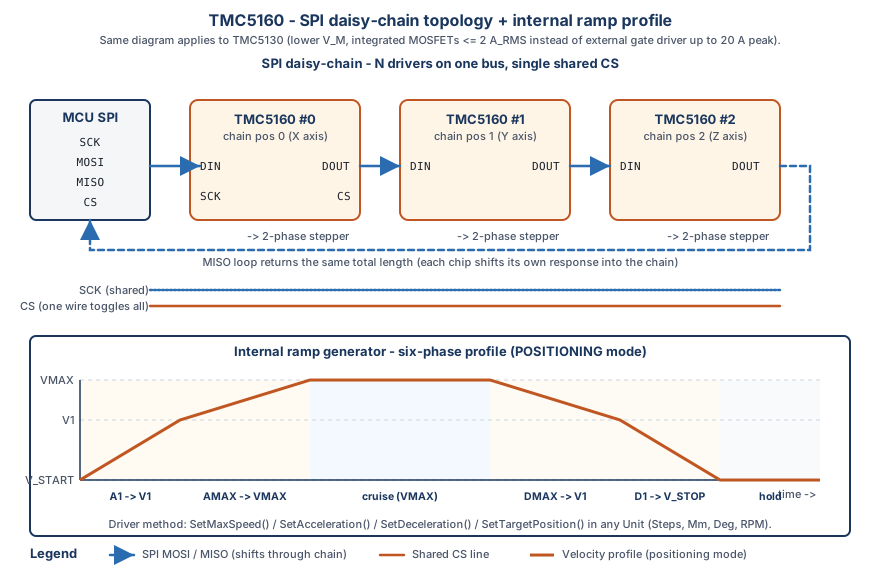
This guide covers the physical connections and hardware requirements for the TMC51x0 stepper motor (TMC5130 & TMC5160) driver chip.
Pin Connections
SPI Interface Connections
1
2
3
4
5
6
7
8
9
10
11
MCU              TMC51x0
─────────────────────────
3.3V      ────── VDD
GND       ────── GND
SCK       ────── SCK
MOSI      ────── SDI
MISO      ────── SDO
CS        ────── CSN
EN        ────── EN (optional, can be tied high)
DIR       ────── DIR (for step/dir mode)
STEP      ────── STEP (for step/dir mode)
UART Interface Connections
1
2
3
4
5
6
7
MCU              TMC51x0
─────────────────────────
3.3V      ────── VDD
GND       ────── GND
TX        ────── UART_RXD
RX        ────── UART_TXD
TX_EN     ────── UART_TXEN (optional, for transceiver)
Motor Connections
1
2
3
4
5
6
TMC51x0          Stepper Motor
──────────────────────────────
1B        ────── Motor Coil B+
1A        ────── Motor Coil B-
2B        ────── Motor Coil A+
2A        ────── Motor Coil A-
Mode Configuration Pins
The TMC5160 has two critical mode configuration pins that determine the operating mode and pin functions:
| Pin | Name | Pin Number | Description | Required |
|---|---|---|---|---|
| SPI_MODE | SPI Mode Select | 22 | Determines communication interface (SPI vs UART) | Yes |
| SD_MODE | Step/Dir Mode Select | 21 | Determines motion control mode (internal ramp vs external step/dir) | Yes |
⚠️ CRITICAL: These pins MUST be configured correctly before power-up. They are read at startup and determine the chip’s operating mode.
Mode Configuration Table
| SPI_MODE | SD_MODE | Operating Mode | Communication | Motion Control | Pin Functions |
|---|---|---|---|---|---|
| HIGH (1) | LOW (0) | SPI + Internal Ramp | SPI interface | Internal ramp generator (motion controller) | REFL_STEP/REFR_DIR: Reference switches ENCA/ENCB/ENCN: Encoder inputs DIAG0/DIAG1: Diagnostic outputs |
| HIGH (1) | HIGH (1) | SPI + External Step/Dir | SPI interface | External step/dir inputs | REFL_STEP/REFR_DIR: STEP/DIR inputs DCIN/DCEN/DCO: DC Step control DIAG0/DIAG1: Diagnostic outputs |
| LOW (0) | LOW (0) | UART Single Wire | UART interface | Internal ramp generator (motion controller) | DIAG0_SWN/DIAG1_SWP: UART I/O SDI_CFG1/SDO_CFG0: NAI/NAO addressing Other pins: Configuration inputs |
Wiring Mode Configuration Pins
For SPI + Internal Ramp Generator Mode (Recommended for most applications):
1
2
SPI_MODE (pin 22) ──────> 3.3V (HIGH)
SD_MODE  (pin 21) ──────> GND  (LOW)
For SPI + External Step/Dir Mode:
1
2
SPI_MODE (pin 22) ──────> 3.3V (HIGH)
SD_MODE  (pin 21) ──────> 3.3V (HIGH)
For UART Single Wire Mode:
1
2
SPI_MODE (pin 22) ──────> GND  (LOW)
SD_MODE  (pin 21) ──────> GND  (LOW)
Important Notes:
- These pins are read at startup - the chip reads their state during initialization
- Must be configured before power-up or reset
- Use pull-up resistors (10kΩ) to 3.3V for HIGH, or tie directly to GND for LOW
- Do NOT leave these pins floating - they must be tied to a defined logic level
Software Control (Advanced):
- If SPI_MODE and SD_MODE pins are connected to GPIO outputs (instead of hardwired), they can be controlled via software
- Use
TMC51x0PinConfigto configurespi_mode_pinandsd_mode_pinif available - Use
driver.io.SetOperatingMode()to change modes programmatically - ⚠️ CRITICAL: Changing mode pins requires a chip reset (power cycle or reset pin) to take effect
- The mode pins are read at startup, so changes won’t be effective until the chip is reset
Pin Descriptions
| Pin | Name | Description | Required |
|---|---|---|---|
| VDD | Power | 3.3V power supply | Yes |
| GND | Ground | Ground reference | Yes |
| SPI_MODE | Mode Select | SPI/UART mode selection (pin 22) | Yes |
| SD_MODE | Mode Select | Step/Dir mode selection (pin 21) | Yes |
| SCK | Clock | SPI clock line | Yes (SPI) |
| SDI | Data In | SPI data input (MOSI) | Yes (SPI) |
| SDO | Data Out | SPI data output (MISO) | Yes (SPI) |
| CSN | Chip Select | SPI chip select (active low) | Yes (SPI) |
| UART_RXD | UART RX | UART receive data | Yes (UART) |
| UART_TXD | UART TX | UART transmit data | Yes (UART) |
| EN | Enable | Driver enable (active low) | Optional |
| DIR | Direction | Step/dir direction input | Optional |
| STEP | Step | Step pulse input | Optional |
Power Requirements
- Motor Supply Voltage: 8V to 60V DC
- Logic Supply Voltage: 3.3V (VDD)
- Current Consumption: ~20mA typical (logic), motor current depends on load
- Power Supply: Separate motor supply recommended with proper decoupling
Bus Configuration
SPI Configuration
- Mode: SPI Mode 3 (CPOL=1, CPHA=1)
- Speed: Up to 4 MHz (recommended)
- Bit Order: MSB first
- CS Polarity: Active low
UART Configuration
- Baud Rate: Typically 500000 bps (configurable)
- Data Format: 8 data bits, 1 stop bit, no parity
- Node Address: 0-254 (8-bit address)
Physical Layout Recommendations
- Keep SPI/UART traces short (< 10cm recommended)
- Use ground plane for noise reduction
- Place decoupling capacitors (100nF ceramic + 10µF electrolytic) close to VDD pin
- Use separate ground planes for motor power and logic if possible
- Route motor power traces away from sensitive logic signals
- Use twisted pair cables for motor connections
Example Wiring Diagrams
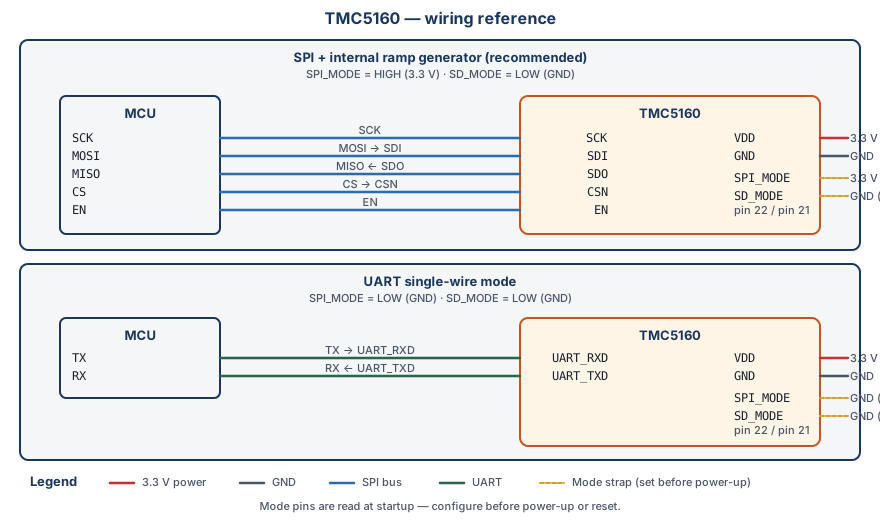
SPI + Internal Ramp Generator Mode (Recommended)
1
2
3
4
5
6
7
8
9
10
11
12
                    TMC5160
                    ┌─────────┐
        3.3V ───────┤ VDD     │
        GND  ───────┤ GND     │
        3.3V ───────┤ SPI_MODE│ (pin 22) - HIGH
        GND  ───────┤ SD_MODE │ (pin 21) - LOW
        SCK  ───────┤ SCK     │
        MOSI ───────┤ SDI     │
        MISO ───────┤ SDO     │
        CS   ───────┤ CSN     │
        EN   ───────┤ EN      │
                    └─────────┘
UART Single Wire Mode
1
2
3
4
5
6
7
8
9
                    TMC5160
                    ┌─────────┐
        3.3V ───────┤ VDD     │
        GND  ───────┤ GND     │
        GND  ───────┤ SPI_MODE│ (pin 22) - LOW
        GND  ───────┤ SD_MODE │ (pin 21) - LOW
        TX   ───────┤ UART_RXD│
        RX   ───────┤ UART_TXD│
                    └─────────┘
Next Steps
- Verify connections with a multimeter
- Proceed to Quick Start to test the connection
- Review Platform Integration for software setup
Navigation <- Quick Start | Next: Platform Integration -> | Back to Index